Most HR decisions still get made by switching screens between systems built for every customer at once. An intelligence module is software that puts an organization's knowledge to work. It connects to the knowledge store and the tools a problem touches, takes the people who own the work through a defined sequence, and produces finished work. The simplest one is a decision desk, and this post shows how to build one with Claude.
HR has spent a decade buying software built for every customer, and it still makes most of its decisions by switching screens.
Think about the last headcount reconciliation or merit cycle your team worked through. Each individual call took a minute or two. Getting to those calls took weeks: the HRIS export, the finance file, four email threads, a Teams chat, and the spreadsheet somebody built years ago that everyone still trusts more than the system.
Earlier this year I wrote about Human APIs, the people who hold an HR function together by carrying information between systems that were never connected. That crawl is what a Human API does all day. It is slow, and it depends on whoever remembers where things live. When that person leaves, the crawl gets longer.
At Ikona Analytics we have started building a different kind of software for this work. We call it an intelligence module. This post explains why HR needs one and what it is, then shows you how to build the simplest kind yourself this week.
Why HR needs something new
Every system an HR team runs on was designed by a product team for thousands of customers and every decision those customers might make. None of them was designed for the decision you are making on Tuesday. So the decision gets bent to fit the screens. Export from one system, paste into another, check the email thread, flip over to Teams, and come back to the spreadsheet to write down what you decided.
The other tools in the room have the opposite problem. A strategy deck is built for your organization, and it stops changing the day it is presented. A dashboard stays current, but it only lets you read. Neither one lets you do the work.
That gap matters more now, because HR teams are starting to build knowledge stores: structured, sourced records of how the organization works, captured from the people who do the work. A knowledge store is only as useful as the work it feeds. Something has to connect it to the decisions and deliverables in front of the team.
Three things now make that possible. Connectors let an assistant read where the work lives. I build in Claude with Gmail, Google Calendar, and Google Drive connected, and where no connector exists, an export dropped in a folder works fine. Models can read 200 email threads or 600 job titles and hold them against each other, which used to be the most expensive part of the crawl. And the assistant can generate a working interface on request, published as a private link or saved as a single HTML file.
What an intelligence module is
Intelligence module: software that puts an organization's knowledge to work. It connects to the knowledge store, to AI models, and to the other systems a problem touches. It takes the people who own the work through a defined sequence: what to look at, what to decide, and what to produce. It reads and writes, so what comes out is finished work, such as a business case, a set of rules, or an updated record. Each one is built for one organization's problem.
A product built for thousands of customers has to fit all of them a little. A module is fitted to one problem on purpose. One size fits one. No vendor would ever build it, because the market for it is one organization, and sometimes one team for one week.
Four things hold for every module, from the simplest to the most complete:
A governed knowledge store is the critical asset. The module is how you use it. Because the knowledge stays in the store, you can rebuild or extend a module when the problem changes, and a simple one takes minutes to make.
A module runs a workflow, and a person makes the calls inside it. It has no persona and no name, and it does not set its own goals. An agent is handed a goal and decides how to reach it. A module is handed a sequence, and the people who own the work decide inside it.
Every write goes through a person. Modules read and write, so they can change records, files, and systems. The person who owns the call decides, the module applies the change, checks that nothing was dropped, and logs who decided what.
Modules climb by what they hand back. The simplest hand back decisions. The next level hands back a finished deliverable. The most complete hand back something that keeps running in another system.
The first rung is the place to start, because you can build it yourself.
How to start: the decision desk
Decision desk: the simplest intelligence module. One interactive page, generated for a single decision or a batch of similar ones, where AI has already gathered and read the material and drafted a suggestion for each item, and where the person who owns the call makes it and sends the answers back to be acted on.
Claude generates the interface for this one decision, holding exactly the evidence it needs and the choices it allows, on one screen. I no longer switch screens or jump between tabs to make a call, and I do not go hunting for the field I need. It is already on the card, because the card was built around the decision. When the decisions are made, the desk has done its job. The ones worth repeating I keep and rerun.
My first desk was my inbox
Email was the obvious place to start, because it is where most of my own crawl happens. I call that one the Reply Desk.
Before Claude drafts a word, it reads at least 50 of my sent emails to learn how I write, and it pulls my signature and booking links from the same mail so it never invents either. Then it pulls a week of inbox and sent mail, opens every thread in full, and checks my calendar so it can drop any thread where the meeting is already booked. It also looks across threads for things I would miss on my own, like the same conversation running in two places, or a commitment I made in one thread that another thread now contradicts. Those catches sit at the top of the page, and they are the main reason the desk is worth building.
Every email that needs me becomes a card with the original message, Claude's read of what the person is asking, and an editable draft in my voice. Each card has five choices: just send it, create a draft for me, revise with my feedback, hold for next round, or no action. Revise and hold both require a note from me, and I now think every desk needs at least one choice like that. Without a place to type, a desk forces you to pick an answer you do not mean.
No email client has this screen. The message, what my calendar and older threads say about it, the draft, and the decision all sit on one card, and I work through a week of email without opening my inbox.
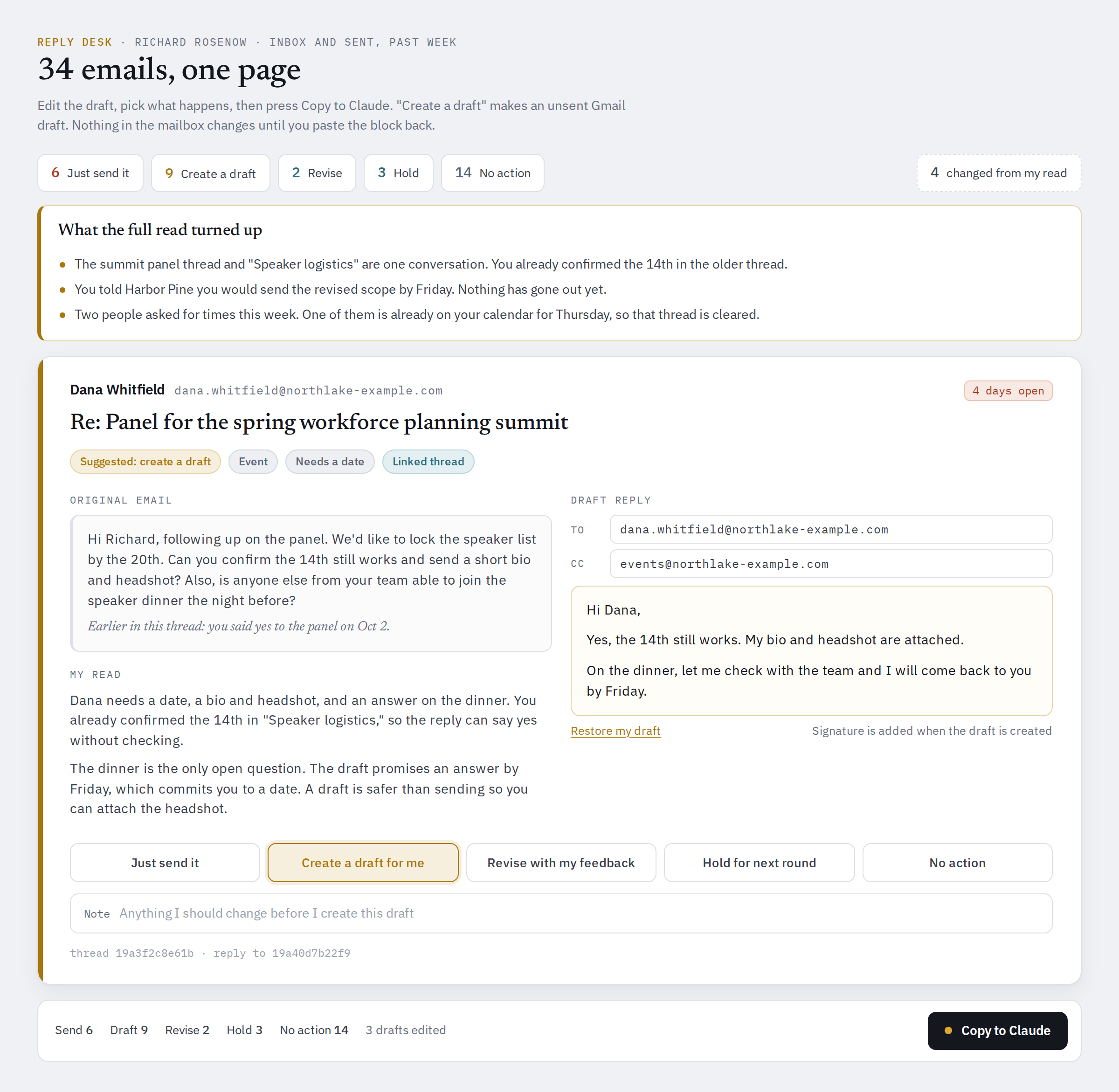
A button at the bottom called Copy to Claude compiles my choices and notes into one block of text. I paste it back, and Claude acts on each item exactly as marked. It confirms every draft exists and is unsent before telling me so, and it lists every dated promise my outgoing mail now makes.
The crawl belongs to Claude now. The judgment stays with me, and it is the only thing on the page asking for my attention.
Decision desks for HR, and how to build them
Email is a good first desk because everyone has an inbox. The bigger opportunity in HR is the recurring work where someone spends days assembling material for a few hours of real judgment. These are the places I would start.
Legacy titles that need a home in a new job architecture
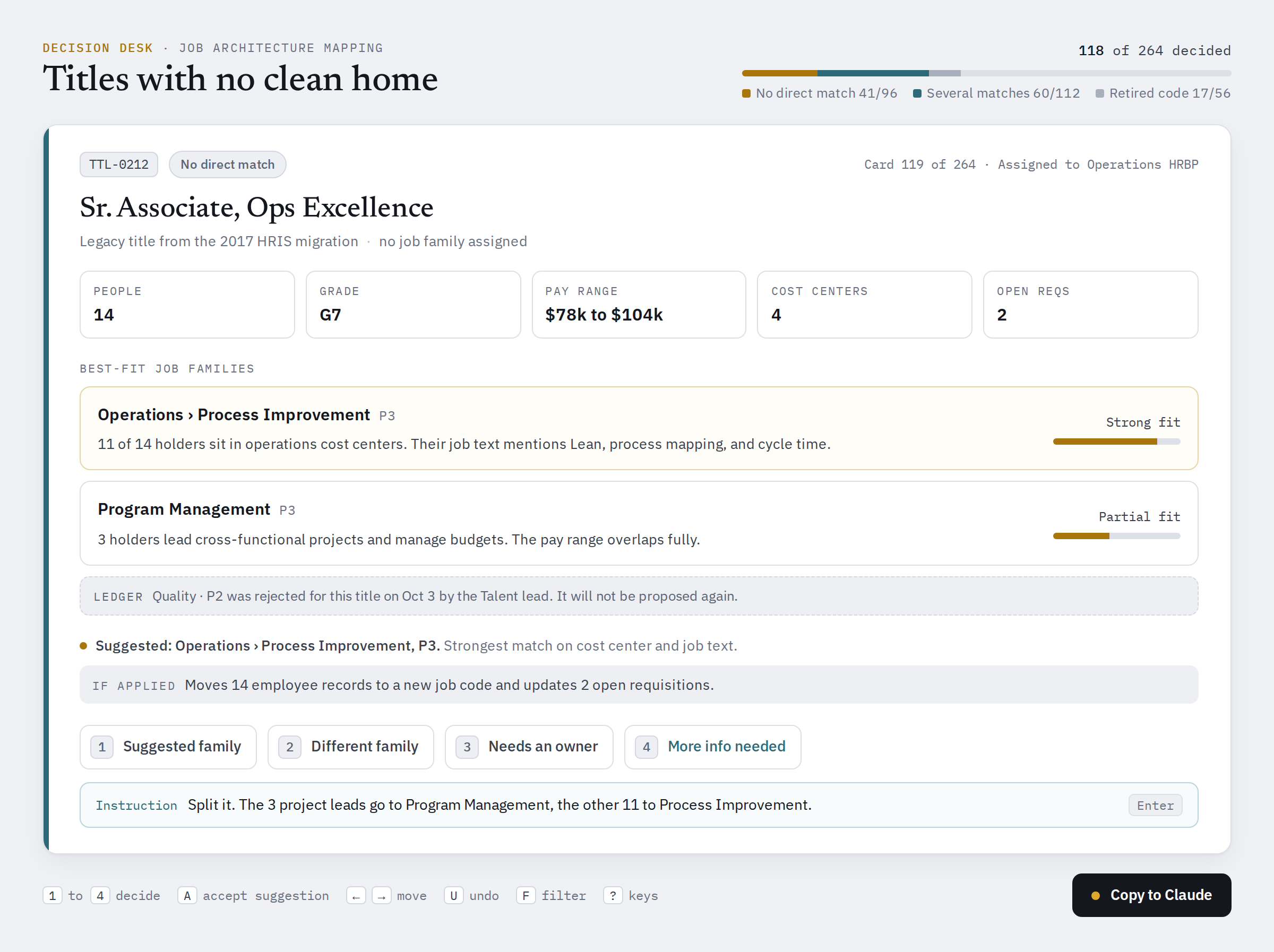
Every architecture project ends with a pile of titles nobody can place. The card shows the title, how many people hold it, the current grade, and the best-fit job families with the reason behind each. The ledger earns its keep here, because it records every rejected mapping so the next pass never proposes it again.
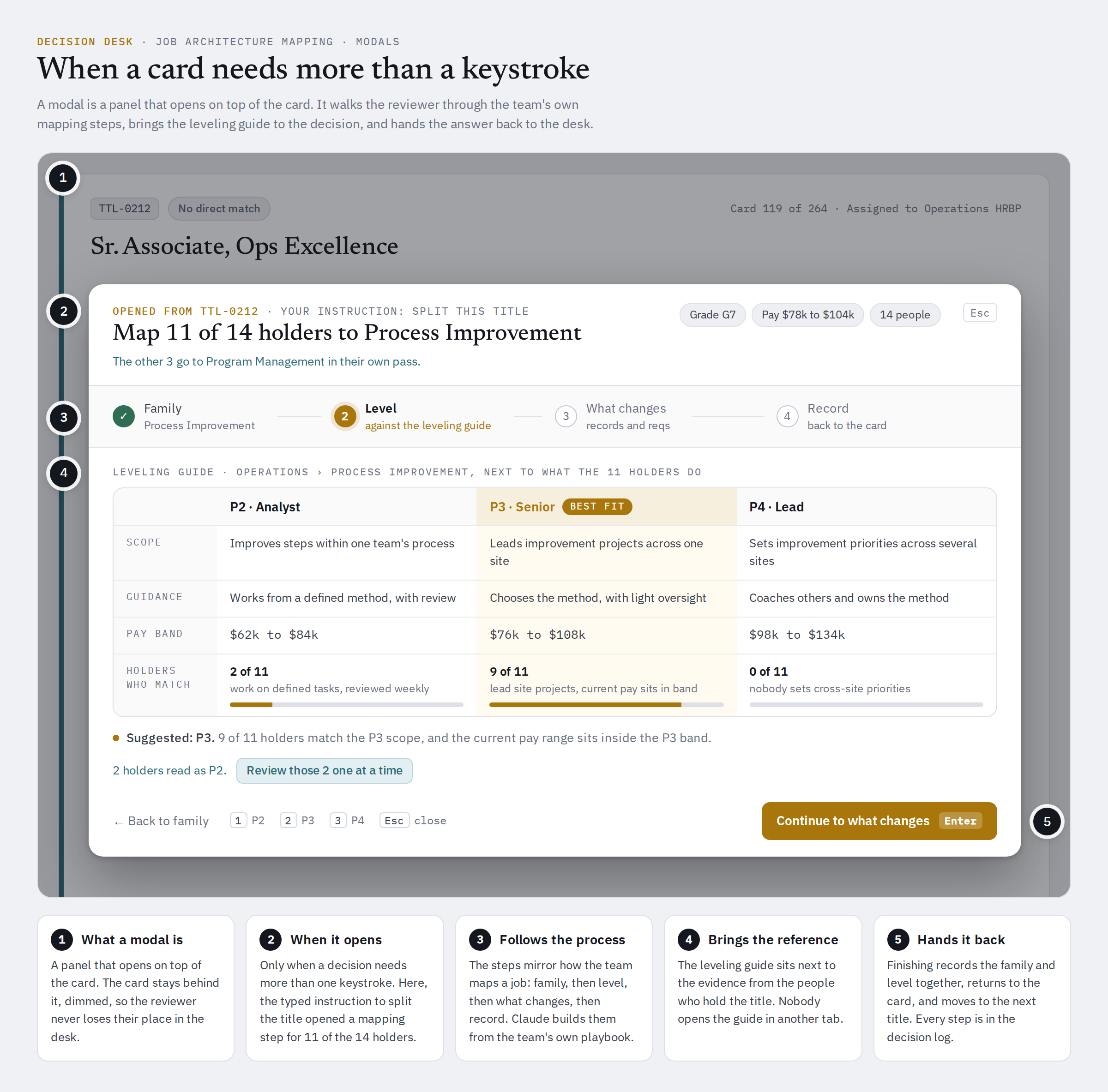
Some calls take more than one keystroke. Mapping a title means choosing a family and then a level, and the level depends on the leveling guide. For those, the desk opens a modal, a panel on top of the card that walks through your team's own mapping steps with the leveling guide beside the evidence. When you finish, it hands the answer back to the card, and nobody has opened the guide in another tab. A modal is also where a desk starts to look like the next rung up, because it takes a person through a sequence.
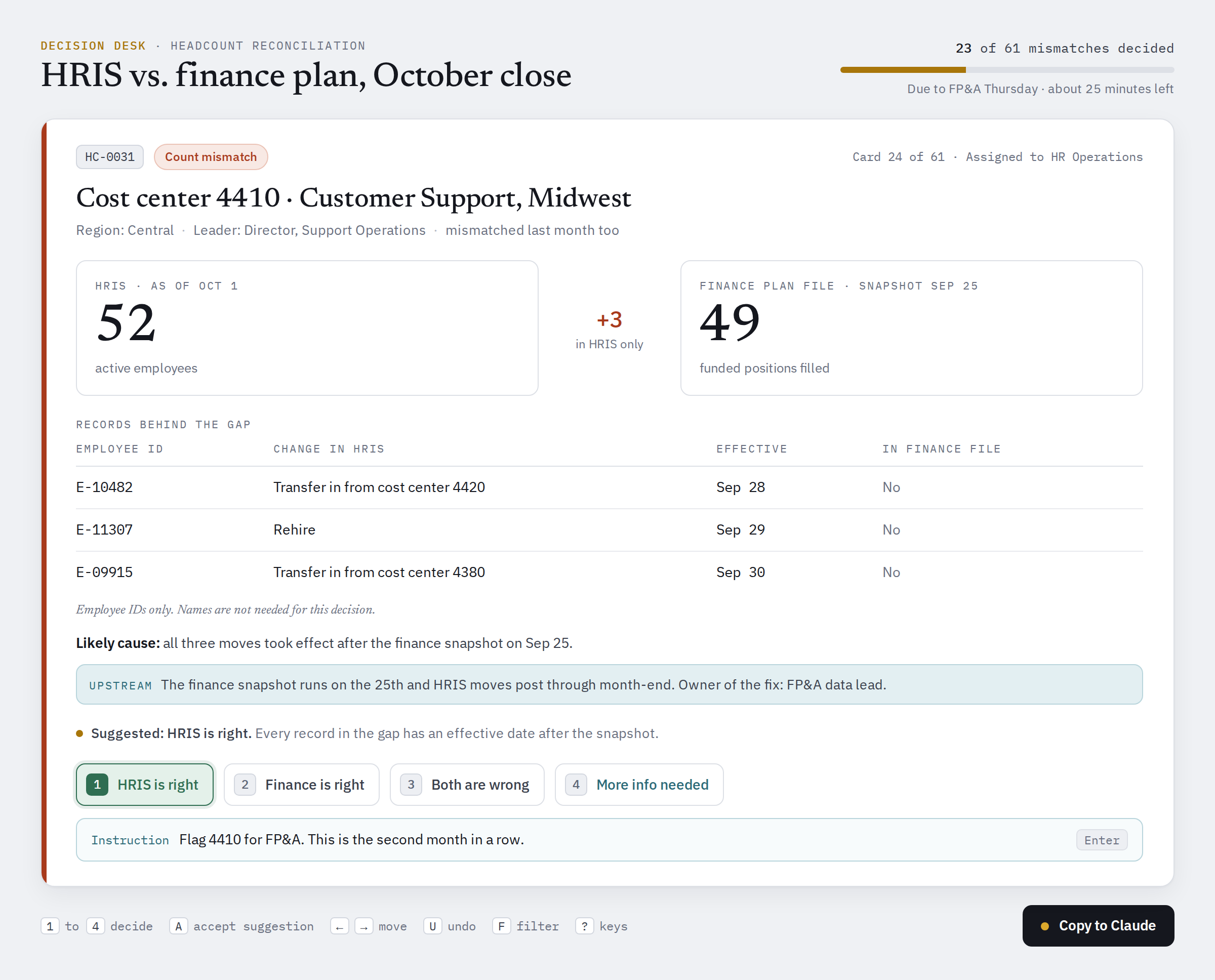
HRIS and finance headcount that do not agree
Every mismatch becomes a card with both values side by side, the records behind each, and the most likely cause. The choices are HRIS is right, finance is right, both are wrong, or more info. This is People Data Supply Chain work, so each fix should name the upstream system and owner that has to change. Otherwise the same mismatch comes back next quarter.
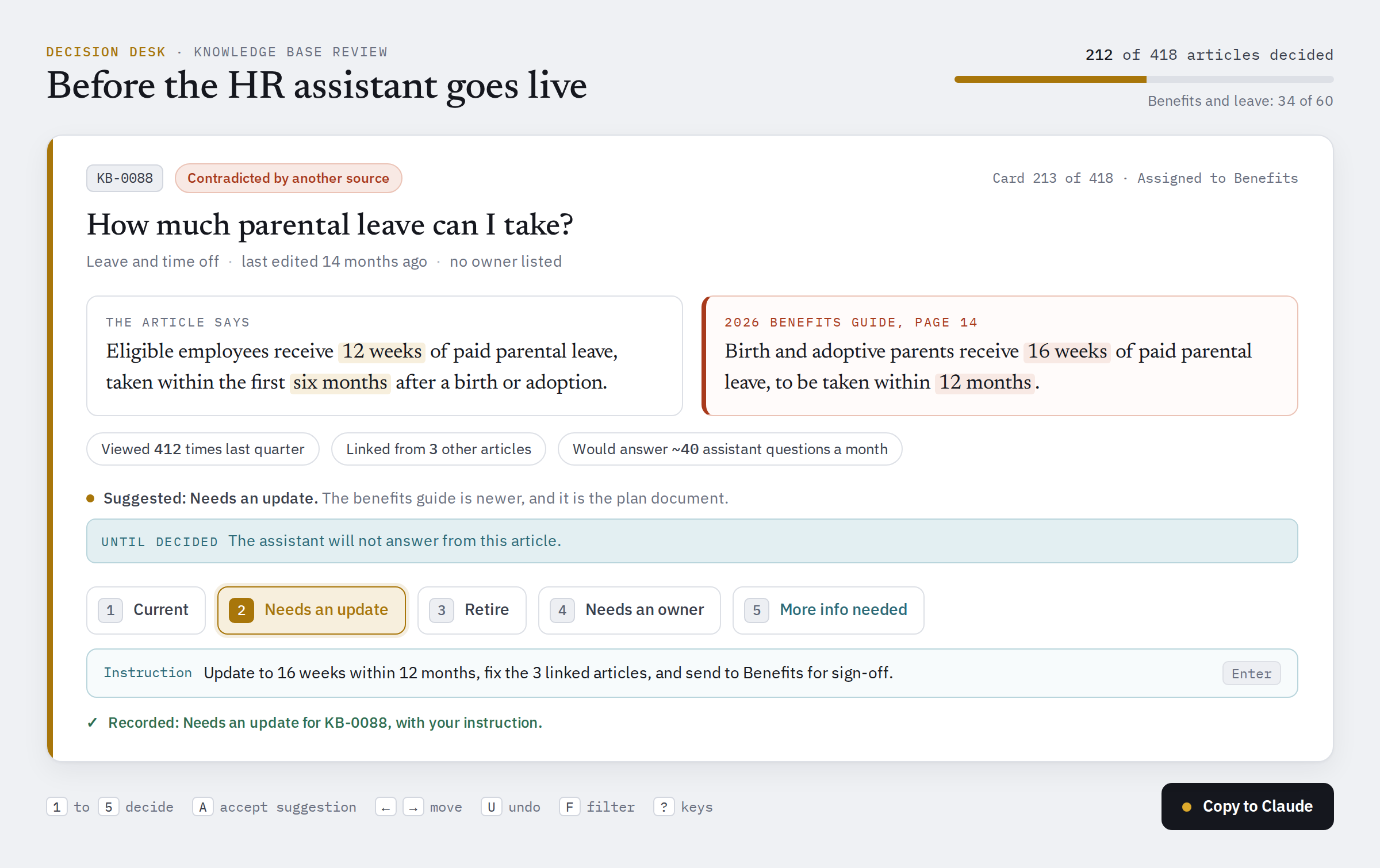
The policy library, before an assistant answers from it
Before an employee-facing assistant answers benefits and leave questions from your knowledge base, somebody has to decide which of those articles are still true. Each card shows the article, when it last changed, and anything that contradicts it. This is the context problem I wrote about in August, worked one article at a time.
The same pattern works for job description refreshes, where each card shows the current text, the proposed rewrite, and the standard behind every change. It works for survey comment coding too, where people confirm or correct a proposed code and their typed corrections end up reshaping the codebook. Bennet Voorhees has written about why feeding verbatims straight into a chatbot disappoints, and a desk puts a person back into that structuring step. Strip names and anything identifying before comments go on a page.
What every desk needs
After building desks for my inbox and for data and editing work, I have landed on five parts.
A bounded set of items, each carrying its own evidence and the reason it was flagged. If the list runs to 3,000, nobody will finish it, so tighten it first. Under about 15, skip the desk and ask in the chat.
A short list of choices. Three to five, always including "more info needed" and a box to type an instruction. The typed instructions are often the most useful output of the whole exercise.
One screen per decision, with the evidence on it. Show where each value came from and what contradicts it, visible without clicking away. Claude's suggestion gets one line, in smaller type, below the evidence. A page that leans on the reviewer gets rubber-stamped.
A way back. The Copy to Claude button, or a hosted page that saves each decision as it is made.
An apply step and a ledger. A decision recorded is not a change made. Claude applies the decisions, shows the arithmetic proving nothing was dropped, and writes down every "keep as is" so the next run never asks the same question twice.
The fifth part is the one people skip, and skipping it is how a review gets stranded halfway. The other common failures are a set too big to finish and a desk that asks people to confirm what Claude could have settled from the evidence. The worst is a decision everyone believes was applied and never was. Track "decided" and "applied" as two separate things, and check the second one.
Guardrails for employee data
A desk carries data, and in HR that data is about people. These are the rules I would hold to:
Put only the fields the decision needs on the card. A job mapping card needs titles and counts. It does not need names.
Whenever employee data is on the page, prefer a hosted page with access controls over a file sent by email. A standalone HTML file carries every record inside it, and it goes wherever it gets forwarded.
Keep employee relations cases and anything medical or accommodation-related off desks entirely. Talk to legal before building a desk that touches individual hiring decisions.
The person who decides owns the decision. Claude's suggestion is a suggestion, and the log should show who made each call.
Ask your security and privacy team what can flow through connectors before you connect anything that holds employee records.
The prompts
Building a desk takes a prompt. Claude writes the page, and the first one usually needs a round or two of fixes. Here are two to start from.
The first is a condensed version of my Reply Desk:
Build me a Reply Desk for my email.

1. Before drafting anything, read at least 50 of my sent emails and learn how I write. Take my signature and booking links from my sent mail. Never invent either.
2. Pull my inbox and sent mail for the past week. Open every thread in full, because previews hide the newest messages.
3. Check my calendar for the next three weeks and drop any thread where the meeting is already booked.
4. Flag the same conversation running in two threads, and anything I committed to in one thread that another contradicts. Put the flags at the top.
5. Build one scrolling page. For each email that needs me, show the original message, your read of what they are asking and what I need to decide, and an editable draft in my voice.
6. Give each email five choices: just send it, create a draft for me, revise with my feedback, hold for next round, or no action. Revise and hold require a note.
7. Add a Copy to Claude button that compiles my choices, edits, and notes into one block of text I can paste back.

When I paste it back, act on each item exactly as marked. Never send anything marked as a draft. Confirm each draft exists and is unsent before reporting it, and list every dated commitment my outgoing mail now makes.
The second is a template for any batch of HR decisions. Fill in the brackets.
I need to make a batch of decisions: [for example, mapping our legacy job titles to the new job architecture].
Sources: [for example, the HRIS job table export and the architecture workbook in our Drive folder].

1. Build the list of items that need a human decision. Before building any page, tell me how many there are and why each was flagged, grouped by reason. Leave out anything you can settle from the evidence, and tell me the rule you used.
2. One card per item, with only the fields the decision needs. No names unless the decision requires them. Show what each source says, anything that contradicts it, and your suggestion in one short line. Do not pre-select it.
3. Choices: [three or four choices], plus "more info needed" and a box to type an instruction.
4. One card at a time. Number keys to decide, arrow keys to move, a count of what is left, and a confirmation of what was recorded before moving on.
5. Save decisions as I go, and add a Copy to Claude button that compiles them into text I can paste back.

When I paste them back, give me the tally before changing anything. Then apply the decisions, show the arithmetic proving nothing was dropped, log every "keep as is" so the next run does not ask again, and list what is still open.
Keep the tally step even when you are in a hurry. It is where you catch a desk that went wrong.
An advanced approach with Claude: the multiplayer desk
Everything above is one person working one desk. Sending a desk to several people and getting their answers back is a way to collaborate we never had before.
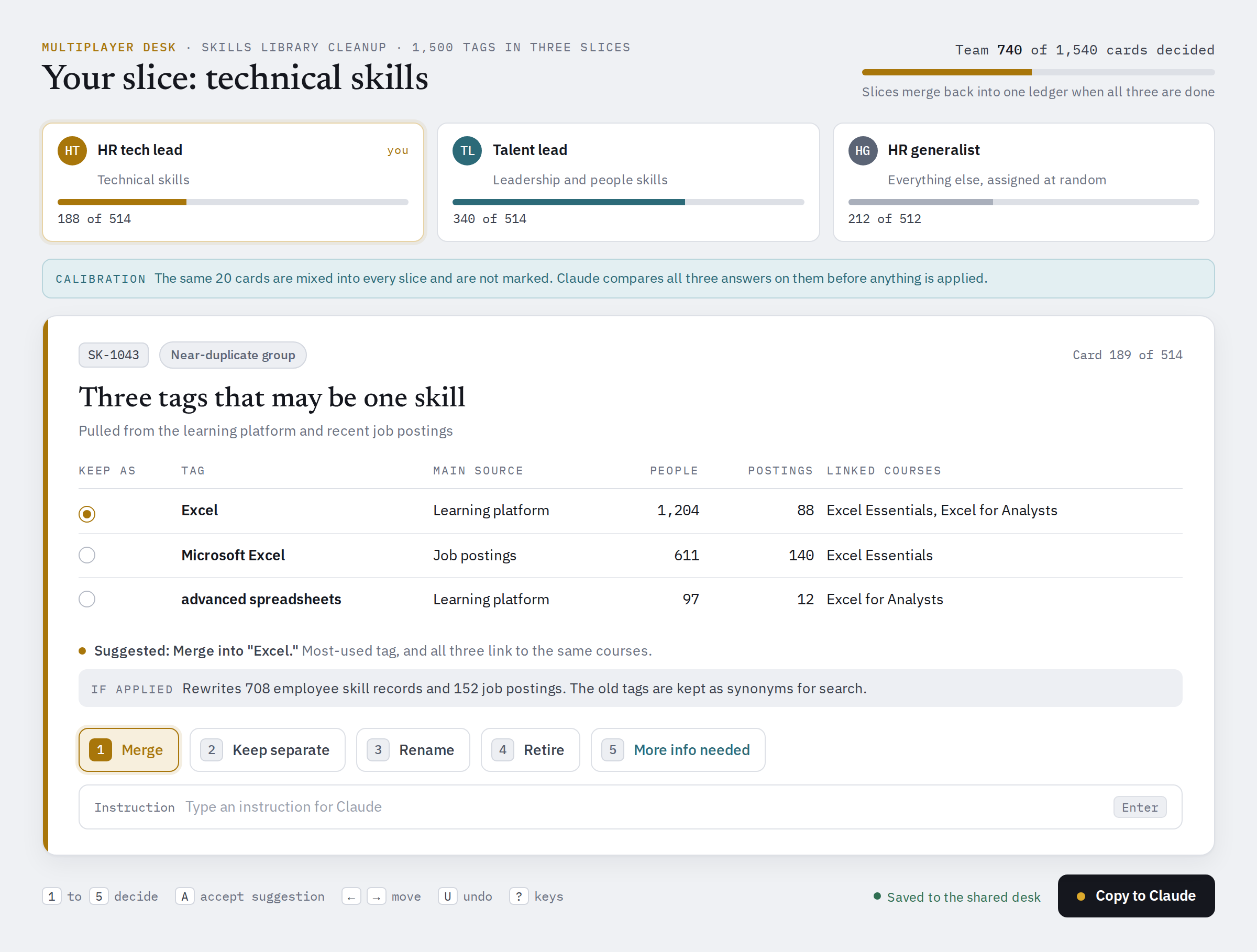
We ran one recently inside Ikona. We had a dataset that needed a human review, item by item, and we used Claude to split it three ways between me and two colleagues. Every item became a card, and each of us worked our third like a stack of flashcards. Read the card, make the call, move to the next one.
I will describe the method on a different problem, because the shape travels better than the subject. Say your team is cleaning up a skills library before it feeds a talent marketplace. You have 1,500 skill tags pulled from the learning platform and from recent job postings. Many of them are the same skill under different names ("Excel," "Microsoft Excel," "advanced spreadsheets"), and others are too vague to act on, like "communication." This is how I would run it as a multiplayer desk.
Build the candidate set once, before anyone gets a slice. Claude groups the near-duplicates, flags the vague and unused tags, and attaches the evidence to each card: where the tag appears, how many people and postings carry it, and its closest neighbors in the library. Check the count and the reasons first, because a mistake here gets copied into every slice.
Split by expertise where you can. Technical skills go to the person who knows them, leadership skills go to the talent lead, and the rest are assigned at random. Then put the same 20 cards in every slice without telling anyone which ones they are.
Give each person their own desk. One link per reviewer, holding only their slice, with identical choices on every card: merge, keep separate, rename, retire, more info, or an instruction. One card at a time, one keystroke per decision.
Merge and check before applying anything. Claude pulls the slices back together and confirms every item has exactly one decision, except the 20 shared cards, which should have one from each reviewer. Then it reports the tally by person and by choice.
Read the shared cards first. They are the calibration check. Where all three reviewers agreed, you can trust the slices. Where they split, you have found a rule the team has not agreed on yet. Settle it, and have Claude recheck every card in the other slices that the same rule touches before anything is applied.
Keep a name on every decision. When someone asks next year why "advanced spreadsheets" was merged into "Excel," the answer has a reviewer and a date on it.
Split three ways, each reviewer faces about 500 cards instead of 1,500, and nobody waits on anyone else to finish.
In "Context is all you need" I argued that a meeting is a context buffer, the place where someone leans in and says "wait, that will not work, because." A multiplayer desk gives every reviewer that chance before any meeting happens, in writing, attached to the exact item it applies to. The meeting that remains only has to cover the cards where people disagreed. And the notes stay behind. That is organizational context captured as a side effect of the work, and HR has never had time to capture it any other way.
There are two ways to hand out the slices. A hosted page that Claude publishes as a private link (you choose who sees it) can save each reviewer's decisions as they go. A standalone HTML file per person opens in any browser with no account, and each reviewer sends back their compiled text. If the cards carry employee data, use the hosted page.
The prompt I would start from:
Build a multiplayer review desk for [the dataset, for example our skills library export].

1. Build the candidate set first. Group near-duplicates, flag items that look vague or unused, and attach the evidence for each one. Show me the count by reason before you split anything.
2. Split the items into [three] slices for [reviewer names]. Route by expertise using these rules: [for example, technical skills to our HR tech lead]. Assign the rest at random. Put the same 20 cards in every slice as a calibration set, and do not mark which ones they are.
3. Give each reviewer their own page holding only their slice. One card at a time, with these choices: [merge, keep separate, rename, retire], plus "more info needed" and a box for an instruction. Save decisions as they go, and give each page a Copy to Claude button.
4. When the decisions come back, merge them. Confirm every item outside the calibration set has exactly one decision. Show me the tally by reviewer and by choice, and every calibration card where reviewers disagreed, before you change anything.
5. After I settle the disagreements, apply the decisions, record who made each one, and list what is still open.
How to level up
Start with one desk this month. Pick one decision your team makes every month that takes a week of crawling to reach. Build a desk for it and work it yourself once. Then send it to two colleagues and compare answers. The items where the three of you disagree are the agenda for your next team meeting.
Once a desk works, you will see where it stops. A desk hands back decisions. The next rungs hand back more.
Modules that hand back a finished deliverable run a longer sequence. A business case module, for example, pulls the evidence from the knowledge store, takes the team through the assumptions one at a time, and produces the case with every claim traced to its source. An interview guide module builds each guide from what every prior interview has already established.
Modules that hand back something that keeps running go further. They produce rules, definitions, or classifications that another system applies every day, so a call the team made once keeps being made the same way.
Both depend on two things a desk can do without. The first is a knowledge store worth building on: captured from the people who do the work, structured, and sourced. The second is a sequence that encodes how the work should be done, and that is methodology more than code.
That is the work Ikona does. The Ikona Systems Diagnostic (ISD) builds the knowledge store, and our team builds the modules and advanced solutions on top of it, not just strategy decks, for the problems in front of your organization. If you have built a desk and want to see what the next rung looks like for your team, reach out and we would welcome the collaboration.
Frequently asked questions
Q: What is an intelligence module?
An intelligence module is software that puts an organization's knowledge to work. It connects to the knowledge store and the systems a problem touches, takes the people who own the work through a defined sequence, and produces finished work: a set of applied decisions, a deliverable, or rules another system runs. Each one is built for one organization's problem.
Q: How is an intelligence module different from an AI agent?
Depending on who you talk to and what their marketing team says, this could qualify as an agent, but for most people's definition an agent is handed a goal and decides how to reach it. A module is handed a sequence, and the people who own the work make the calls inside it. Every change a module makes to a record or a system goes through a person first.
Q: How is an intelligence module different from SaaS or a dashboard?
SaaS is built once for every customer, and a dashboard only lets you read. A module is built for one organization's problem, reads and writes, and produces finished work. One size fits one.
Q: Is a decision desk an intelligence module?
Yes, the simplest one. A decision desk hands back a batch of decisions and applies them. It is the rung most HR teams can build themselves with an assistant like Claude.
Q: Do I need to be technical to build a decision desk?
No. You describe the desk in a prompt and Claude builds the page. The hard part is knowing the decision well enough to say what evidence belongs on each card and what the choices should be. That part is HR expertise, and it is the part Claude cannot supply.
Related reading
"Human APIs": The Real Labyrinth of HR Transformation, on the people who carry information between HR systems.
Context is all you need, on why the knowledge a module draws from matters for AI in HR.
Bennet Voorhees on what MCP connectors do for HR data, the plumbing underneath every module.
Why feeding your survey verbatims to ChatGPT won't tell you what you need, Bennet on the structuring step a comment desk hands back to a person.
Building the semantic layer is no longer negotiable, on the shared layer of meaning every module reads from.
Written by
Richard Rosenow
Richard Rosenow is Co-Founder and Chief Product Officer of Ikona Analytics, where he owns the ISD (Ikona Systems Diagnostic) methodology, client delivery, and product. He started as an HR business partner at Citi and spent 15 years in People Analytics at GE, Meta, Uber, Nike, and Argo AI, then as VP of People Analytics Strategy at One Model. He created the Workforce Systems Leader and People Data Supply Chain frameworks, and was named to HR Executive's Top 100 HR Tech Influencers list in 2023, 2024, 2025, and 2026.
Learn more about our team